As parents, we all want to be able to protect our children from the world and make sure they grow up with confidence, self-awareness, and great interpersonal skills. As a parent, I want to make sure my little girls grow up nurtured and loved, and although a little bit sheltered because realistically I want them to be safe from traumatic and damaging experiences. Some of the most used applications that I discussed with my high school students recently involve the ever-popular, Facebook, Snapchat, and TikTok, all of which involve the opportunity to connect and interact with peers and others.
Facebook:
What is it? Facebook has been around for the longest and acts as an online connection to people, places, and events. There are so many uses for Facebook including sharing posts, photos, websites, and videos. People can create events, tag each other in any of the different mediums shared.

When allowing a child to use social media such as Facebook it is often a good idea to maintain open communication about expectations you have with your student and how they interact with others online. Your student will want to maintain good privacy settings, talk them through setting them up, talk to them about monitoring who and what they are tagged in on Facebook. Future schools and employers look at social media accounts when accepting and hiring. Help them not share personal information that others could potentially use against them.
Snapchat:
What is it? Snapchat is a more creative approach to sharing photos and videos, where you can directly send one of these media and then your connected friend who views it only has a certain amount of time to see the pic or vid. There are filters and voice modifiers to make interacting fun and entertaining, and a way to create a story in one’s profile that shares a day's events, only for twenty-four hours.
Help your student by setting the expectation that they must adhere to family rules and etiquette online. Snapchat can be potentially damaging when pictures and videos are shared from one phone to another. Something that was meant to be private could be shared with others and the world. Parents should talk to their students about the importance of privacy and not adding people to their Snapchat friend list who they do not know.
TikTok:
What is it? Tiktok has been a newer invention and allows users to create mini-videos, about 15 seconds and string four videos together for a maximum of 60 seconds in a story. The videos can be spliced together with friends, have added Augmented Reality features and incorporate music from around the web. Tiktok allows it's users to add friends, curate their videos and liked videos to share with those they connected with.
Parents can help their students by making sure they understand friending random people can be dangerous and potentially expose them to unwanted videos. Students should have good privacy settings so not everyone can see their videos, and make sure they are using the app in an acceptable way that their parents agree on.
Using good common sense to help guide your own student in this world can help keep everyone safe. Young adults are looking for connections and finding them all around the world in the apps that they use. A simple way to keep your teenager safe online is to talk with them and set the tone for them to be able to come to you and speak about any issues.
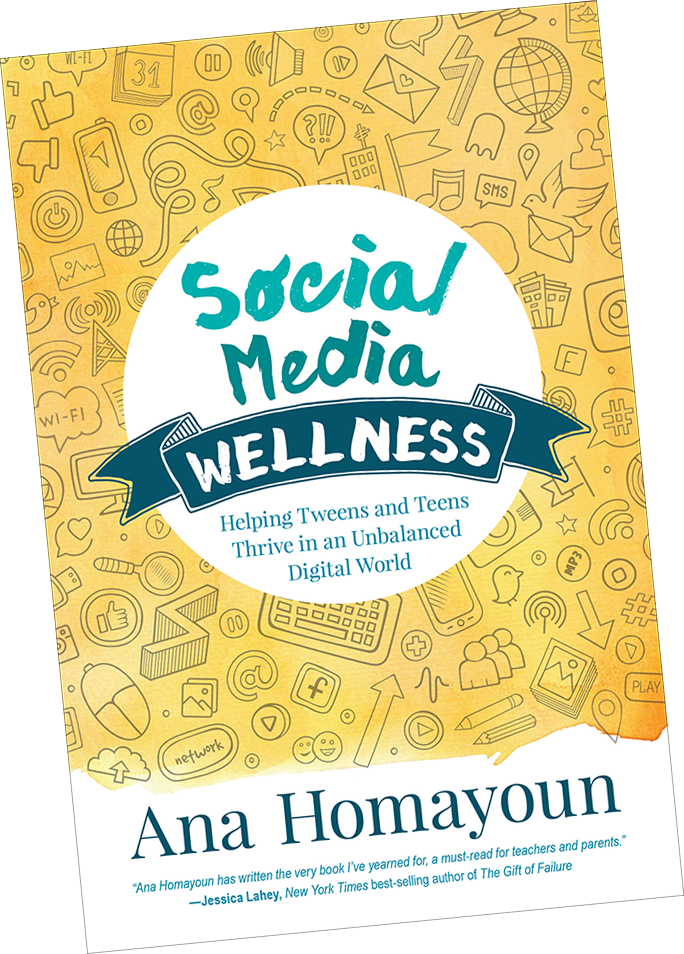
During an online course, I was tasked with reading Social Media Wellness, by Ana Homayoun. If you would like more information on how to connect with your teenager about social media, I highly recommend this book!
The nerdy way to cache Instructional Strategies for Geometry! - Brought to you by Gibson EdTech Advising
Showing posts with label Digital Citizenship. Show all posts
Friday, August 23, 2019
Sunday, November 18, 2018
Adventures of a High School Math Teacher
Recently I have been struggling with students working in my class, they are pre-occupied with a lot of other things, district championship football, plays, music recitals, fall break, and just about anything but Geometry. I had the opportunity to have our new Math Coach come and visit my 4th Period classroom, and she saw students acting out at their worst while I was trying to direct instruct. I thought the entire afternoon went horribly wrong, but she had nothing but positive things to say and assist me with her feedback.
She stated they were all distracted and she could see that in my College Prep Geometry Course. She also said she saw a lot of the students respected me and to make it an expectation that students work properly. It really made me feel accomplished that there was a sign of respect in my classroom, as well as her only looking at the good things in my classroom, I did not see them in my own analysis of how the class had gone. She mentioned taking a moment to speak with them about their abilities and the future I wanted for them. That Geometry is the content, but the ability to sit and refrain from other distractions, that practice for their future careers, the soft skills they could learn from me, were crucial. She stated that if I just re-iterated that cell phones and talking out during the middle of a meeting would get students fired from a job, then maybe they would start to listen and practice what good active learning was supposed to look like.
Cell phones have always been an issue, and a challenge she suggested was for 15 minutes of no cell phones. Then 20 minutes, and build up to the whole class time. Although cell phones can sometimes be useful, putting education and professionalism first is going to be key in making sure my 4th period can learn at the level they were required to learn. I look forward to this conversation Monday with my students and I am excited to see how they respond to my request.
She stated they were all distracted and she could see that in my College Prep Geometry Course. She also said she saw a lot of the students respected me and to make it an expectation that students work properly. It really made me feel accomplished that there was a sign of respect in my classroom, as well as her only looking at the good things in my classroom, I did not see them in my own analysis of how the class had gone. She mentioned taking a moment to speak with them about their abilities and the future I wanted for them. That Geometry is the content, but the ability to sit and refrain from other distractions, that practice for their future careers, the soft skills they could learn from me, were crucial. She stated that if I just re-iterated that cell phones and talking out during the middle of a meeting would get students fired from a job, then maybe they would start to listen and practice what good active learning was supposed to look like.
Cell phones have always been an issue, and a challenge she suggested was for 15 minutes of no cell phones. Then 20 minutes, and build up to the whole class time. Although cell phones can sometimes be useful, putting education and professionalism first is going to be key in making sure my 4th period can learn at the level they were required to learn. I look forward to this conversation Monday with my students and I am excited to see how they respond to my request.
Labels:
#BearcatPride,
Classroom Decor,
Digital Citizenship,
Education,
Feedback,
Geometry,
Respect
Friday, October 20, 2017
Conditional Statement Story - Post Observation Reflection
Ever read the story, "If You Give a Mouse A Cookie" by Laura Numeroff? I had not until I married an elementary school teacher, and read the book she had in her classroom. Several years ago after reading the book I had an idea that was going to allow me to use the story for my students as well. What could a Geometry Teacher do with a children's book you may ask? Well it's simple, the entire book is written as conditional statements, if p then q. In my second unit in the school year, Reasoning and Proofs, we delve into the mechanics of writing conditional statements, their converses, inverses, even contrapositives, and using the symbols to write these statements. The statements are used throughout my course to write and prove postulates, properties, theorems and corollaries. Students immerse themselves in the logic of the statements and decide whether or not there is a truth value to a given statement.
When I originally designed my project I had students write their own book and draw illustrations in it. But now as I am becoming more tech savvy and more digitally in-tuned with my students needs. I figured why not adapt the use of computers to make a PowerPoint of the book? The end goal is to make Google Slides the tool we use. But until students can log-in to a true Google Account and collaborate with students on the use of Google Apps, I am stuck with what little true collaboration my students and I have now. Students are going to have to write their own Conditional Statement Story Project, much like "If You Give a Mouse a Cookie." The requirements are that the story has 10 conditional statements, 4 original statements, 2 converses, 2 inverses and 2 contrapositives that flow together much like the story I read to them Tuesday. Students will then work in pairs to write their story and illustrate it with pictures from the web. I have a Google Slide set up to show them the proper uses of a Google Image Search to utilize photos for their presentation that have permission to reuse and distribute the image. I added this component of Digital Citizenship to promote the Creative Commons that many other students already know about.
Since students could not access Google Slides from the network computers we were utilizing, I then had to change gears in my planning and have all students create their stories using Microsoft PowerPoint. They then uploaded their typed rough draft and final PowerPoint presentation to my Dropbox account. My Wiki page linked here allowed them access to the links I provided for my Dropbox, where I could then add the presentations to my Google Drive and convert them to Google Slides to easily share online. One key characteristic of being an educator is that I am very flexible and while I would like to continue my journey in learning and utilizing Google Apps, I know that there are tools out there already that help me with technically updating my craft.
Wednesday I was observed by my administrator while students were working on this project and so I am using this post as my reflection piece. (Lesson Plan Here) Some thoughts I had while thinking back on my activity are; I would like to change my requirements for the rough draft for next year by making students label their statements, and also have them put the labels in the notes section of their PowerPoint or Google Slide. Although most students completed a nice cover page some needed to be asked to do so, so next year I am going to add a cover page section into the rubric. I feel students worked really hard on their stories, had good questions about the project, and I chose some of the best ones to share below.
Please read and enjoy the great things these students accomplished while writing, creating and learning online.
![]() |
| 6th Period Starting the Project |
Since students could not access Google Slides from the network computers we were utilizing, I then had to change gears in my planning and have all students create their stories using Microsoft PowerPoint. They then uploaded their typed rough draft and final PowerPoint presentation to my Dropbox account. My Wiki page linked here allowed them access to the links I provided for my Dropbox, where I could then add the presentations to my Google Drive and convert them to Google Slides to easily share online. One key characteristic of being an educator is that I am very flexible and while I would like to continue my journey in learning and utilizing Google Apps, I know that there are tools out there already that help me with technically updating my craft.
![]() |
| 7th Period Starting the Project |
Please read and enjoy the great things these students accomplished while writing, creating and learning online.
Tuesday, August 15, 2017
YCCOSP Stem Academy
While working with the YCCOSP Program (See my first Blog on my summer work) I have been given a lot of autonomy to create learning activities for my students. This past Spring we had a chance to help design and implement a Saturday STEM Academy. For four Saturdays, students were immersed in activities in Chemistry, Biology, Engineering and Mathematics. Professors from York College of Pennsylvania created meaningful learning experiences for the YCCOSP students in the STEM field. Since our school has discontinued all courses in computer science our students are never given the chance to experiment with coding or different computer programs.
While researching for a graduate course I found several articles on Edutopia about using Scratch coding from MIT to teach coding and mathematics. Scratch is a basic system and teaches students coding using building blocks on the online coding program. Several of the students had been through my Geometry class and had learned about the use and concept of Fractals. Since our students have never been exposed to any type of coding programs I decided they needed to gradually be given steps to learn how to use the Scratch programming and scaffolded their learning activity with three different tiers of difficulty.
The first assignment took students through the basics of scratch code and taught them how to make the online icon do the simplest of moves to create a given polygon. (Easy Scratch Coding Edutopia Blog) The second assignment was then the intermediate level of coding which had students create a code to have the icon make a random polygon and then name it based on the parameters given. (Intermediate Scratch Edutopia Blog) Finally students took the program to create the Sierpinski Triangle, a fractal program that made a recursive pattern within itself. (Advanced Scratch Edutopia Blog). From each of the blogs I found I created instructions and questions for the students to complete each level of difficulty in coding with the Scratch program.
Students were then tasked to share their code to their college Google+ account. In the YCCOSP Math STEM Community that I created, students explained what they created and shared it with the world. This allowed for another deeper conversation about the way one needs to convey themselves online and in social media. I informed students that the sharing of their code and what their creations did, since it was put online they also had to understand that their words would be able to be seen by others in the social media. This simple step created the sense that they as digital citizens must be precise in their wording and represent their own selves in a positive academic manner.
The Saturday morning was filled with a lot of fun and students were very involved in the program. Students who had never seen code in their academic career were exposed to a new programming method that can help teach students. Students were very successful in coding their projects and even commented that they enjoyed learning and "playing around" with the website. The program ran very well and in the future I hope I can create as meaningful of a set of projects as I have here. You can get all of my documents used in my TpT store for free! Coding Projects for STEM Mathematics
While researching for a graduate course I found several articles on Edutopia about using Scratch coding from MIT to teach coding and mathematics. Scratch is a basic system and teaches students coding using building blocks on the online coding program. Several of the students had been through my Geometry class and had learned about the use and concept of Fractals. Since our students have never been exposed to any type of coding programs I decided they needed to gradually be given steps to learn how to use the Scratch programming and scaffolded their learning activity with three different tiers of difficulty.
The first assignment took students through the basics of scratch code and taught them how to make the online icon do the simplest of moves to create a given polygon. (Easy Scratch Coding Edutopia Blog) The second assignment was then the intermediate level of coding which had students create a code to have the icon make a random polygon and then name it based on the parameters given. (Intermediate Scratch Edutopia Blog) Finally students took the program to create the Sierpinski Triangle, a fractal program that made a recursive pattern within itself. (Advanced Scratch Edutopia Blog). From each of the blogs I found I created instructions and questions for the students to complete each level of difficulty in coding with the Scratch program.
Students were then tasked to share their code to their college Google+ account. In the YCCOSP Math STEM Community that I created, students explained what they created and shared it with the world. This allowed for another deeper conversation about the way one needs to convey themselves online and in social media. I informed students that the sharing of their code and what their creations did, since it was put online they also had to understand that their words would be able to be seen by others in the social media. This simple step created the sense that they as digital citizens must be precise in their wording and represent their own selves in a positive academic manner.
The Saturday morning was filled with a lot of fun and students were very involved in the program. Students who had never seen code in their academic career were exposed to a new programming method that can help teach students. Students were very successful in coding their projects and even commented that they enjoyed learning and "playing around" with the website. The program ran very well and in the future I hope I can create as meaningful of a set of projects as I have here. You can get all of my documents used in my TpT store for free! Coding Projects for STEM Mathematics
Subscribe to:
Posts (Atom)

:max_bytes(150000):strip_icc()/GettyImages-586113582-587422f63df78c17b65ea081.jpg)


